Build Something Useful for Yourself
My wife didn't like dinner, so I built a Meal Planner app. Here's how you can build one too.
Jump straight to: Build it yourself
I decided to cook turkey tacos again and my wife nearly lost it. I am on deck to cook most of the evening meals in our house, but not all of my meals are favorites. I decided this is another problem for AI to solve.
People are always asking me how to get started with AI. I encourage them to use AI to build useful things for themselves. So, that's what I did this week.
Howard, my AI chief of staff, already orders all of our groceries from Instacart twice a week. But my wife had no visibility into what I was ordering or planning to cook. She finds out when she opens the fridge and rolls her eyes at my choices. (Don't get me wrong... she's actually quite lovely).
So I designed a Meal Planner app.
It's loaded up with my favorite recipes, including some favs from my mother-in-law and my grandmother's Depression-era chocolate gravy with biscuits.
The next 3 weeks of meals are planned out, with beautiful pictures to go along with them. My wife can scroll through the next week and swap out main dishes, or even sides, to her preference.
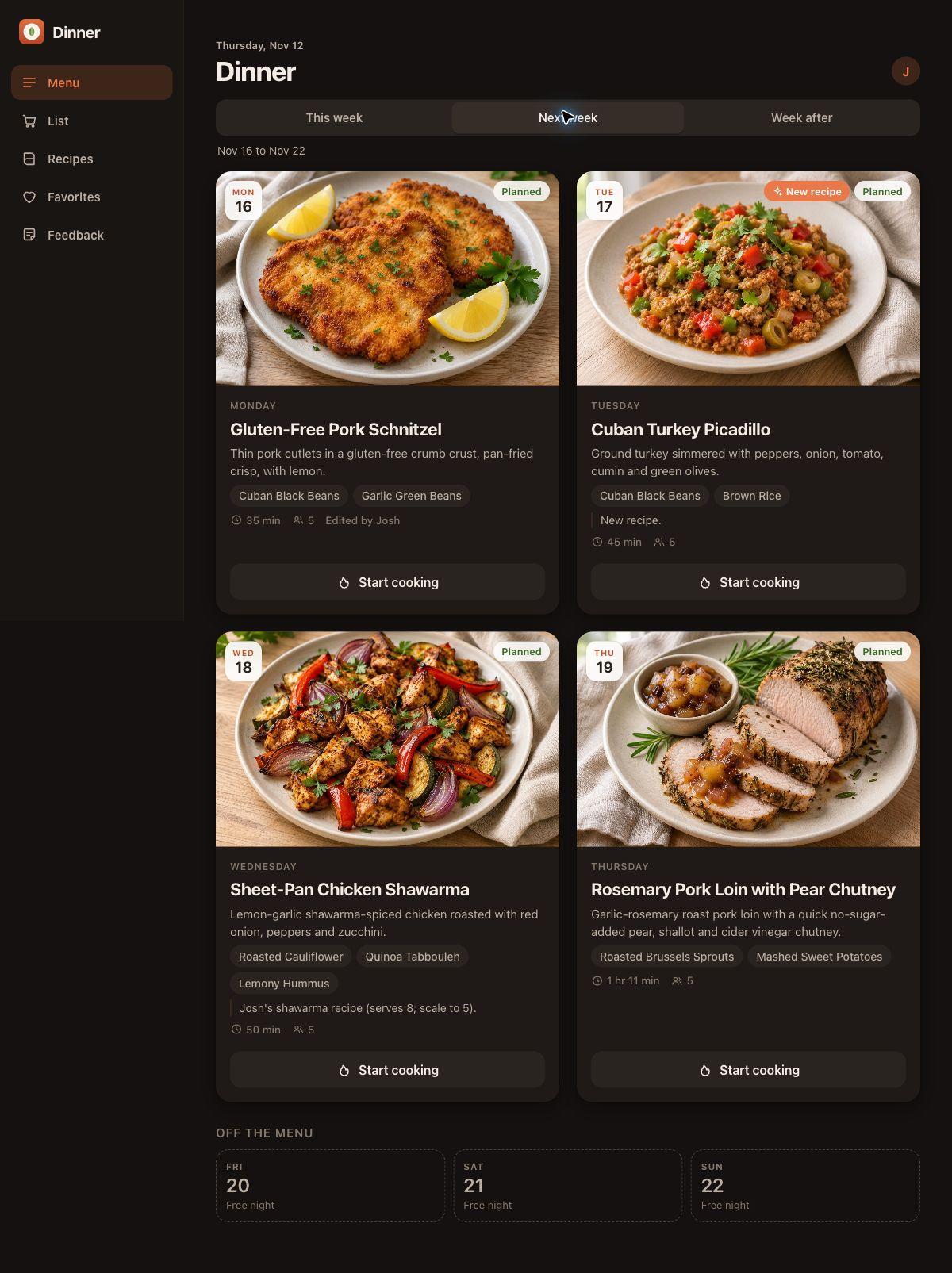
See the full Meal Planner project in my AI Projects.
Then a day or two ahead of when I'm cooking, the groceries get ordered automatically and land on my doorstep. When it's time to cook, I just head over to the stovetop, open the app and pull up the step-by-step instructions.
I showed my wife this week and she absolutely loved it. (So user acceptance testing has gone well so far.)
The whole thing took me less than half an hour of my own time. I've been working with agents so much that I know the pitfalls, and I have a bit of an assembly line setup for software. Design choices, rules and quality assurance are already baked into any idea I start pursuing.
That comes with time though. And you have to start somewhere.
So if you're one of those people who wants to build something useful, I'd suggest giving this app a go. It's pretty universally applicable. We all either cook at home or have someone in the family who cooks for us. Whichever end you're on, you can benefit from building something like this.
And guess what my wife's favorite part of the app is? Every meal includes a star rating. I wonder how those turkey tacos will score.
Build it yourself
You don't need to know how to code. The prompt below tells Claude to make the technical decisions and explain anything you need to do in plain language.
Here's what it builds: a recipe library for your family's favorites, a rolling 3-week plan of mains and sides, a way for anyone you invite to swap a dish or mark a night as leftovers, one combined shopping list, a cook mode with step-by-step instructions and timers, and star ratings after every dinner. Favorites come back more often. Low scorers fade out.
You can bolt on the automatic grocery ordering later. The prompt treats it as optional, once the app works.
- Download the Claude desktop app. Claude Code lives inside it, in the Code tab.
- Sign up for the Pro plan. It's $20 a month.
- Open the Code tab and pick a folder. Choose an empty folder for the project, or create a new one. This is where your app will live.
- Paste the prompt below and let Claude cook. It will interview you first, a few questions at a time. Answer them, then read its plan and approve it before it starts building.
A few things that will make it go smoother:
- Have your recipes ready to paste. The family ones especially. Links and photos of recipe cards work too, so dig out the old recipe box.
- Expect to iterate. The first version won't be perfect. Tell it what bugs you and it will fix it.
- Let your family break it. Hand them the phone and watch where they get stuck. That's your real user acceptance testing.
- It will ask before spending money. The prompt tells it to fill your grocery cart only, and never check out without your OK.
The prompt
Download the prompt or copy it below.
I want you to build me a family meal-planning app. I cook most of the dinners in our house, and I want the rest of my family to see what's coming, change it before I shop, and tell me what they thought afterward.

I'm not a developer. Make the technical decisions yourself, explain anything I need to do in plain language, and keep the setup as simple as possible.

## Before you write any code

1. Interview me first. Ask me these, a few at a time, and wait for my answers:
   - How many people we cook for, and which nights of the week I cook.
   - Allergies, dietary rules and foods anyone refuses to eat.
   - Who else should be able to see and edit the plan, and what devices they use (most likely phones).
   - Where we buy groceries and how (in person, Instacart, a store's own delivery app).
   - My favorite recipes. I'll paste them in, share links, or upload photos of recipe cards. Family recipes count.
2. Write a short plan in plain English: the screens, what each one does, and how my family will open the app on their phones. Show me the plan and wait for my OK before building.

## What the app does

- **Recipe library.** Store every recipe with a title, a photo, ingredients with quantities, step-by-step instructions, prep and cook time, and whether it's a main or a side. Let me add recipes by pasting text, a link or a photo of a recipe card, and clean them up into one consistent format.
- **A rolling three-week plan.** Fill the nights I cook with a main and one or two sides, three weeks ahead. Mix it up: no repeating a main within two weeks, and balance proteins and vegetables across the week. Never overwrite a night someone has already changed.
- **Family edits.** Anyone I invite can scroll the upcoming weeks, swap a main or a side for another recipe, mark a night as "skip" or "leftovers," and leave a note for the cook.
- **Shopping list.** For any range of days, build one combined grocery list scaled to the number of servings, with duplicates merged and items grouped by store section. Skipped and leftover nights are left out. Include a one-tap copy so I can paste it into my grocery app.
- **Cook mode.** When it's time to cook, show tonight's main and sides as one combined set of step-by-step instructions, in the order I should actually do them, with built-in timers. Big text, one step at a time, and keep the screen awake while I'm cooking.
- **Star ratings.** After each dinner, anyone can rate it from 1 to 5 stars and add a comment. Use the ratings when planning: favorites come back more often and low scorers fade out.

## Design guidelines

- Phone first. It will mostly be used on a phone, often with one hand and messy fingers.
- Lead with the food. Large, appetizing photos on every meal. If a recipe has no photo, show a clean placeholder until I add one.
- Calm and simple. A warm, uncluttered look with a readable font, no more than a few screens, and obvious buttons. My family should understand it without instructions.
- Readable in the kitchen. High contrast, large tap targets, and a dark mode.
- Fast. Opening the app and seeing this week's dinners should take one tap.

## How to build it

- Use the simplest setup that works. One small app and one database file is fine. No paid services, accounts or subscriptions without asking me first.
- Keep it private. Only the people I invite should be able to see it. Recommend the easiest safe way for my family to open it on their phones, explain the trade-offs in plain English, and walk me through any setup I have to do myself.
- Never put passwords or keys in the code. If you need one, tell me exactly where to get it and where to put it.
- Build in small steps. After each feature, test it yourself, fix what's broken, and show me a screenshot before moving on.
- Load the recipes I gave you, and generate the first three weeks of meals so the app is useful on day one.
- When you're done, write a short README that explains how to start the app, add a recipe, and back up the data.

## Groceries (optional, after the app works)

If I want to automate ordering, help me set up a scheduled task that builds my grocery cart from the shopping list a few days before I cook. Fill the cart only. Never check out or spend money without my explicit approval each time.

Start by asking me your first interview questions.
Keep Reading
Own Your Own Intelligence
You can rent the latest reasoning engine, but you must own the context and memory for your business. Here's why, and how my second brain does it.
To a Hammer, Everything Is a Nail
The hybrid model of code plus agents is what provides the best blend of reliability, cost and performance from my experience.
Get New Posts
Follow the build.
One email per post: the AI systems, the acquisition screens, and the real numbers — including what didn't work.
Go Deeper
Want to talk through this?
I do strategy calls on AI agents, AI operations, and building autonomous systems.